
The AI generator is the reason we bought it. I typed “corporate snack box for 8” and had a sellable builder ready the same afternoon. We launched three seasonal boxes in a week — something that used to take a month.
- AI Product Box Builder for WooCommerce
Generate boxes with AI, then let shoppers build and buy more
Describe a holiday hamper, makeup kit, or corporate gift once — AI builds the full box structure from your catalog. Publish a guided “build your own” experience and watch average order value climb as customers fill slots, unlock discounts, and add gift notes.
- AI Box Generator
- 14-Day Money-Back
- Built by TrendyTheme
The shift
From friction to box-powered sales
Same store. Completely different revenue path once AI + guided boxes enter the flow.
Before
Without a box builder
- Setting up seasonal gift boxes takes hours of manual configuration
- Customers buy one product and leave — low average order value
- Gift shoppers can’t personalize — they abandon or buy elsewhere
- Bundles feel static; no “build your own” excitement
- Upsells are buried in related products, not in the flow
- Holiday & corporate gifts need kits you can’t assemble on the fly
After · AI
With Product Box Builder + AI
Generate a complete box with AI from a short prompt and your catalog — steps, products, pricing intent, and copy. Then guide shoppers through a delightful builder: fill slots, unlock discounts, add gift messages, review, and checkout. You launch faster, sell more items per order, and turn one-time buyers into repeat box customers.
AI
Faster setup
AOV
Bigger baskets
Convert
Guided buying
Sales growth
How this plugin helps you sell more
From AI-generated boxes to high-value checkouts — a clear path to more revenue.
01
Launch faster
Generate with AI
Type a prompt like “Holiday gift box, 6 slots, fixed $59.” AI builds steps, product picks from your catalog, and ready-to-edit content — so you launch campaigns in minutes, not days.
Prompt → full box
Catalog-aware
02
Grow basket size
Invite them to build
Publish a guided builder. Shoppers fill slots, unlock gifts and box discounts, hit order-amount targets, and discover products they’d never find alone — bigger baskets follow.
Guided slots
↑ AOV
03
Launch faster
Checkout with confidence
Gift notes, live summaries, and a final review reduce hesitation. Clear totals mean fewer abandoned carts and happier gift recipients.
Review step
Fewer abandonments
Features
Increase Sales with Powerful Box Builder Features
From flexible box creation to a seamless customer experience, Boxyan gives you everything you need to sell customizable product boxes on WooCommerce.
AI Box Generator
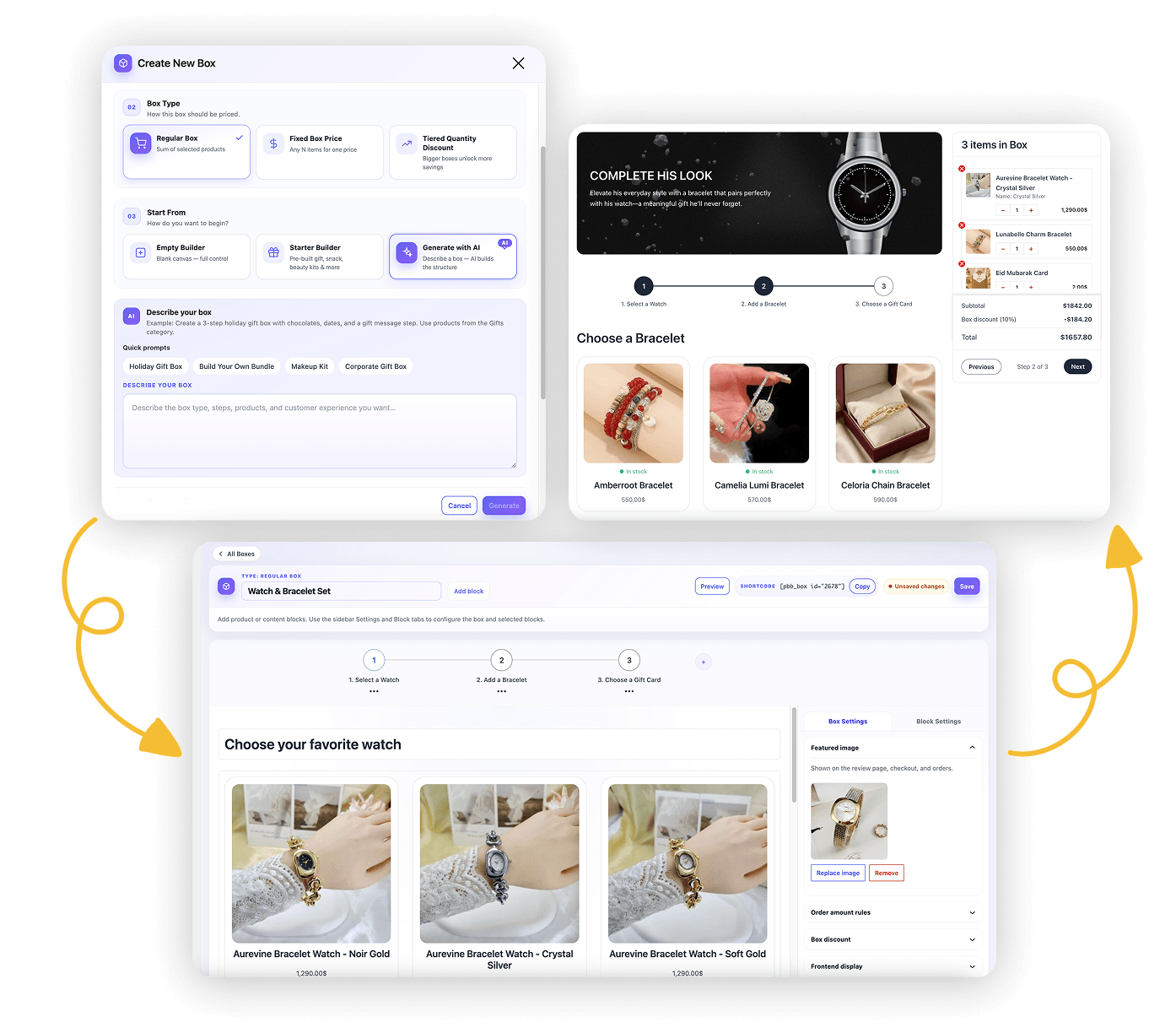
Stop building boxes from scratch. Describe what you want to sell — AI creates a complete, catalog-aware box: steps, product suggestions, pricing style, and storefront-ready content. Launch holiday, makeup, corporate, and pick-and-mix boxes in minutes so you can focus on selling.
- One prompt → full box structure ready to edit & publish
- Uses your real WooCommerce catalog context
- Quick templates: Holiday Gift, Makeup Kit, Corporate, Pick & Mix & more
- Works with Groq, OpenAI, OpenRouter, Together, Ollama & custom APIs
- Ship more campaigns → more gift seasons → more sales
Visual Drag and Drop Builder
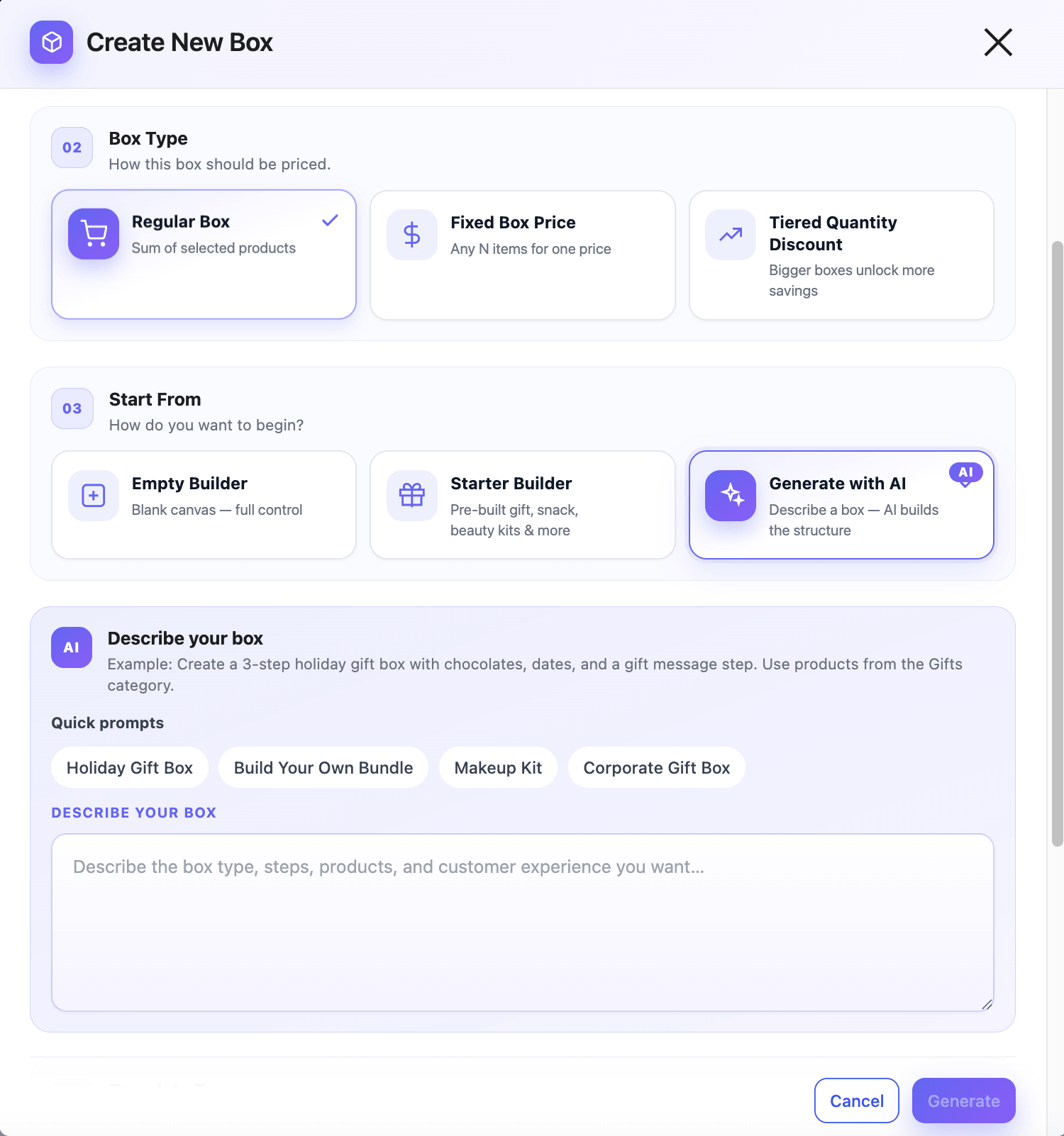
Design every step with predefined blocks — or start from an AI-generated draft and refine. Headings, product grids, and layout without fighting a rigid template. Launch a new seasonal box in hours, not weeks.
- Product grids, lists, carousels, options, notes & more
- Edit AI-generated or starter boxes visually
- Easy steps building with predefined blocks
- Match your brand layout fast with rich styles and colors options
Multi-Step Box Builder
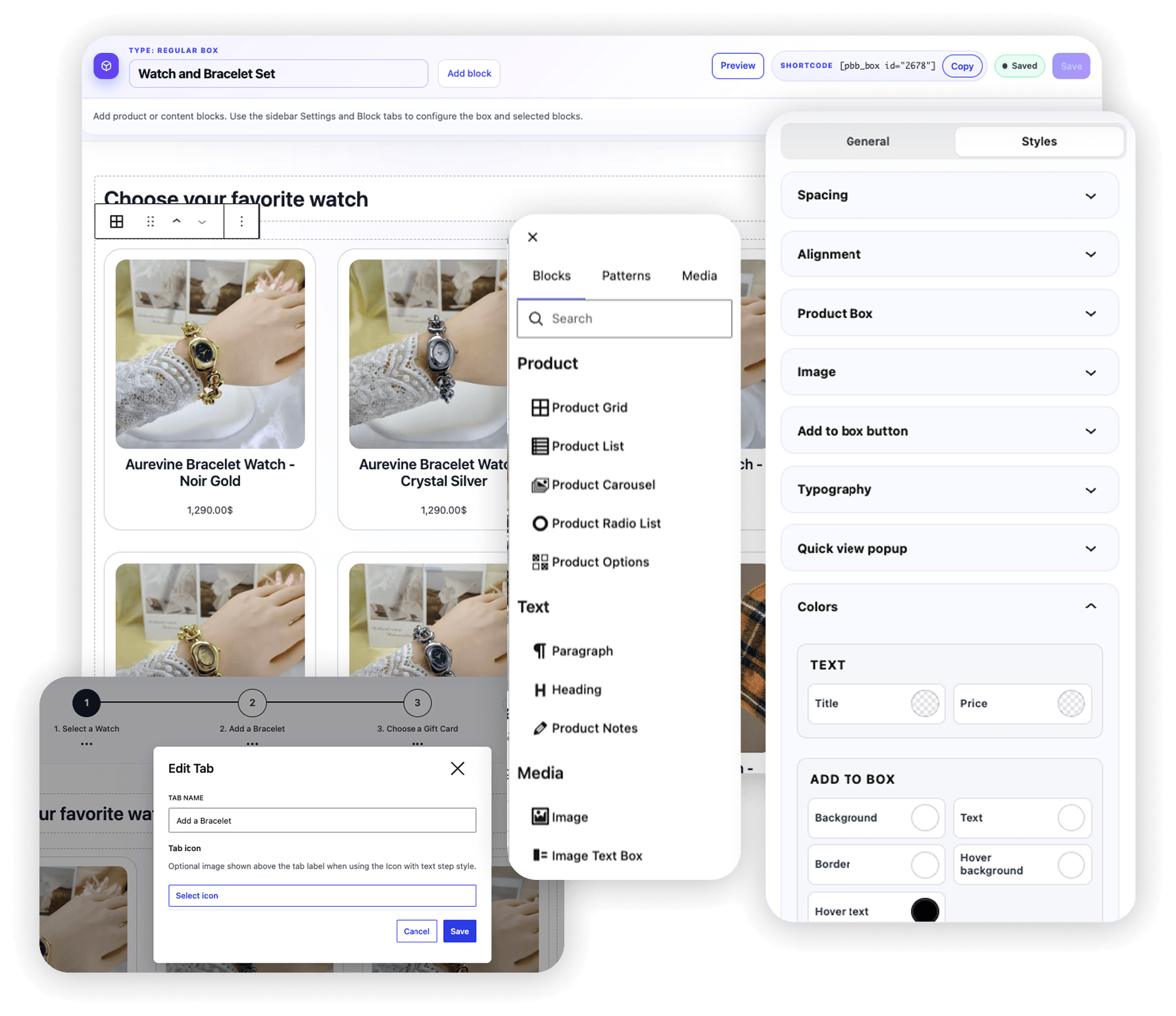
Break the purchase into clear steps — pick a base, choose treats, add extras, then review. Guided flows keep shoppers engaged longer and naturally lead them to fill more slots.
- Step-by-step or one-page layouts
- Progress indicators that reduce drop-off
- Perfect for gift, snack, beauty & corporate kits or any bundles and offer
- More items per order without feeling pushy
Smart Product & Category Picking
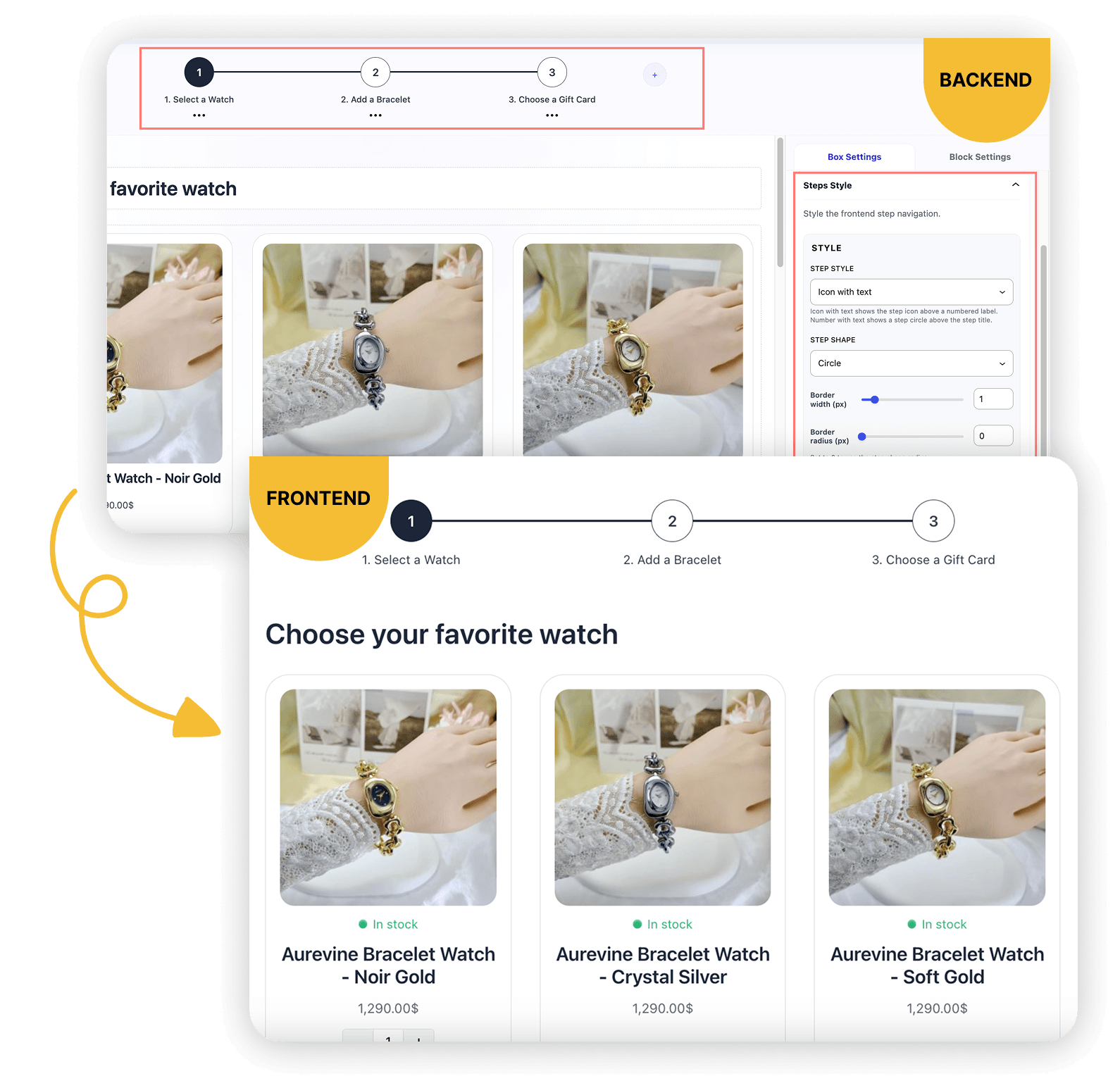
Curate what belongs in each slot. Shoppers browse the right products at the right moment — so discovery becomes upsell, not overwhelm.
- Organize slots by various product styles and categories
- Add multiple categories in the same step
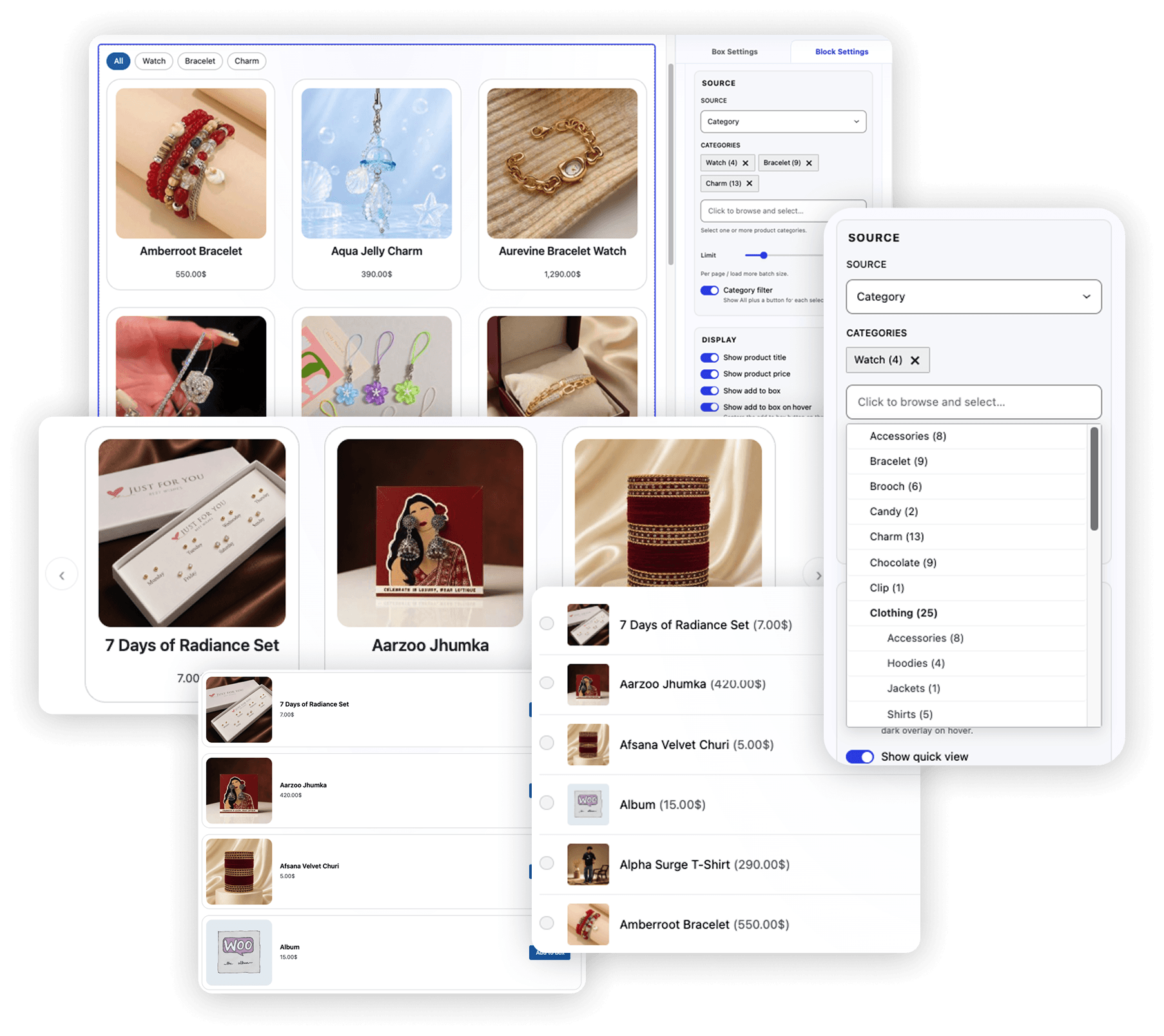
- Use Category filter with loadmore or pagination
- Clear selection UI that works on any theme
Fixed Box Price
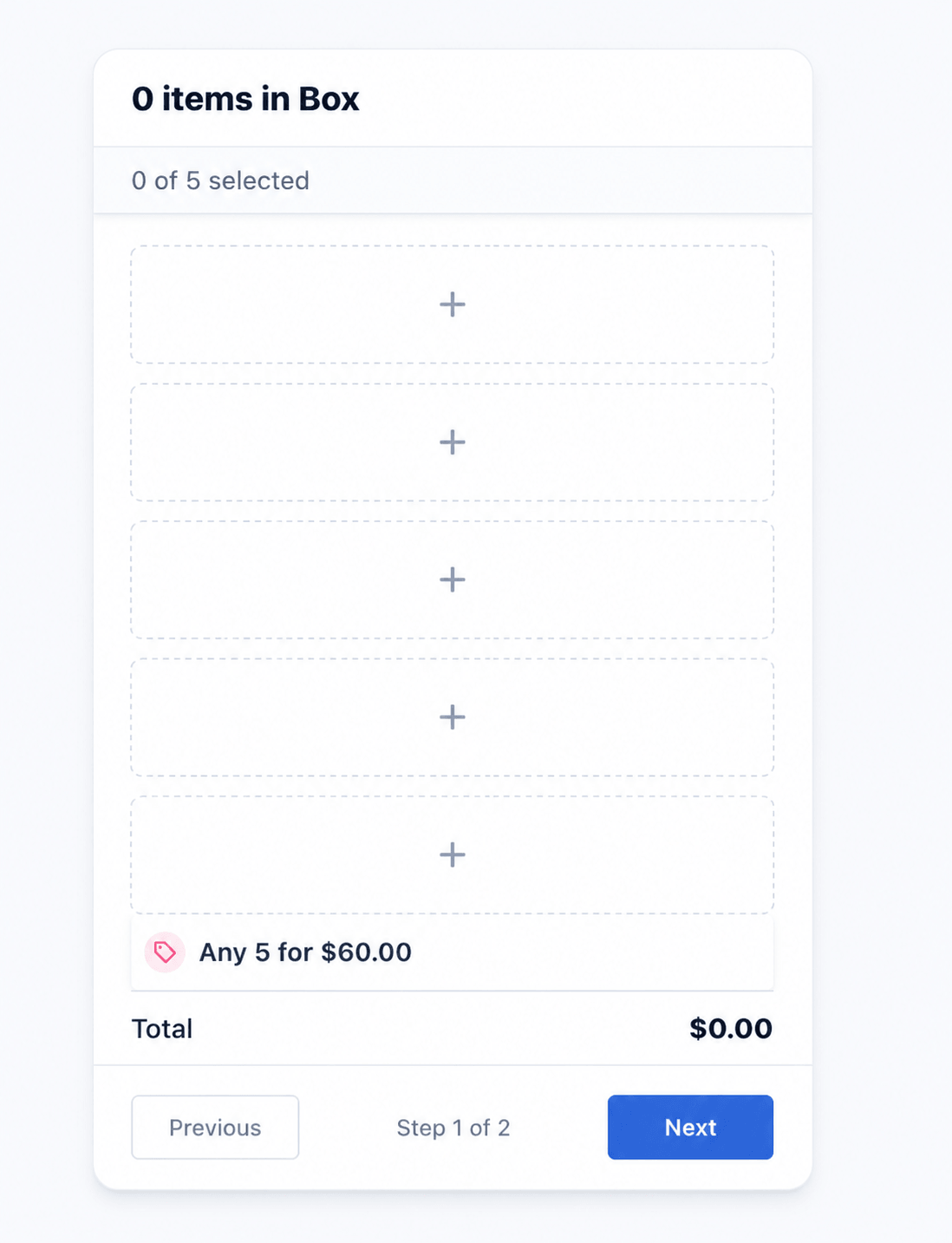
Sell “any 5 for $60” style deals — shoppers fill the required slots and pay one clear bundle price, no matter which products they pick. Simple offer. Higher completion. Bigger baskets.
- Set required product count + one bundle price
- Live empty slots so shoppers know what’s left to fill
- Retail total, Total Save & Fixed box price when the box is full
- Optional box discount on top of the fixed deal
Tiered Quantity Discount
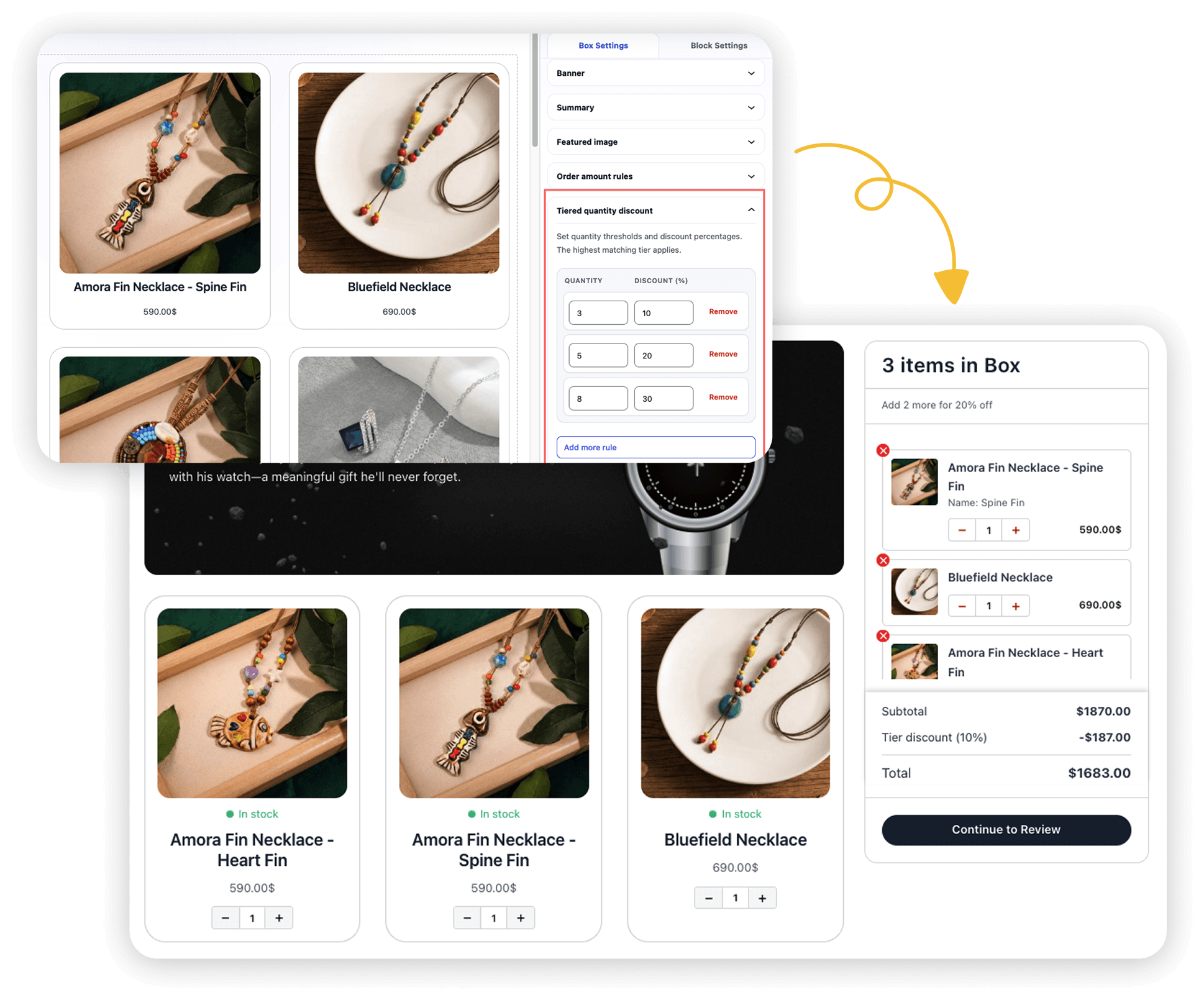
Reward shoppers as they fill more slots — 3 items for 10% off, 6 for 20%, 9 for 30%, or your own tiers. Product prices stay visible, and the next savings level nudges them to keep building.
- Custom quantity thresholds with percentage off
- Highest matching tier applies automatically
- Live progress hints toward the next discount level
- Ideal for pick-and-mix, snacks, jewelry & volume kits
Predefined Box Sizes
Offer fixed pack sizes (9 / 14 / 24 Pack, etc.). Shoppers pick a pack, then fill exactly that many slots at the pack price — like Fixed Box Price, but with multiple size options and optional pack discounts.
- Multiple packs with quantity, price, and optional discount %
- Display styles: simple cards, image cards, unit-price cards, dropdown
- Show pack picker in the summary or as the first step
- Popular-choice badges and live slot progress like fixed-price boxes
Gift Notes & Personalization
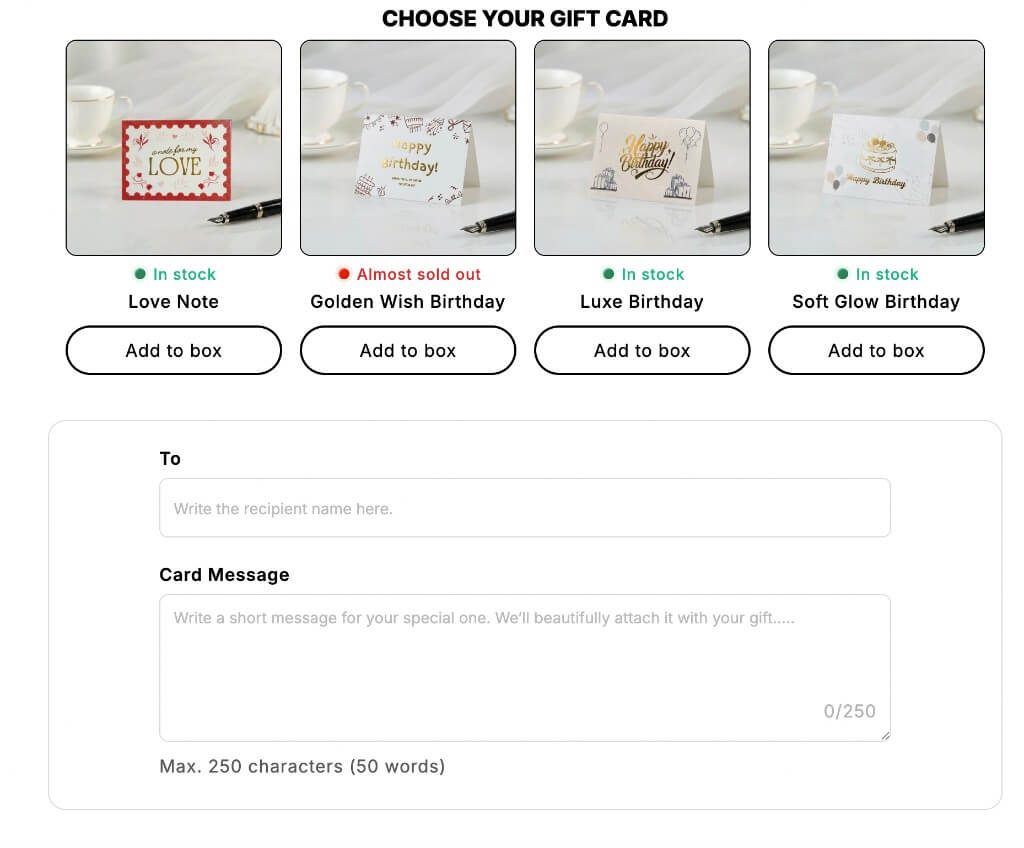
Birthday, corporate thank-you, or holiday surprise — shoppers add a message and feel the box is “theirs.” Personalization is one of the strongest reasons people choose you over a marketplace.
- Gift message fields built into the flow
- Unlock free gift products with gift rules (qty or spend)
- Higher perceived value = willingness to pay more
- Messages carry through to order details
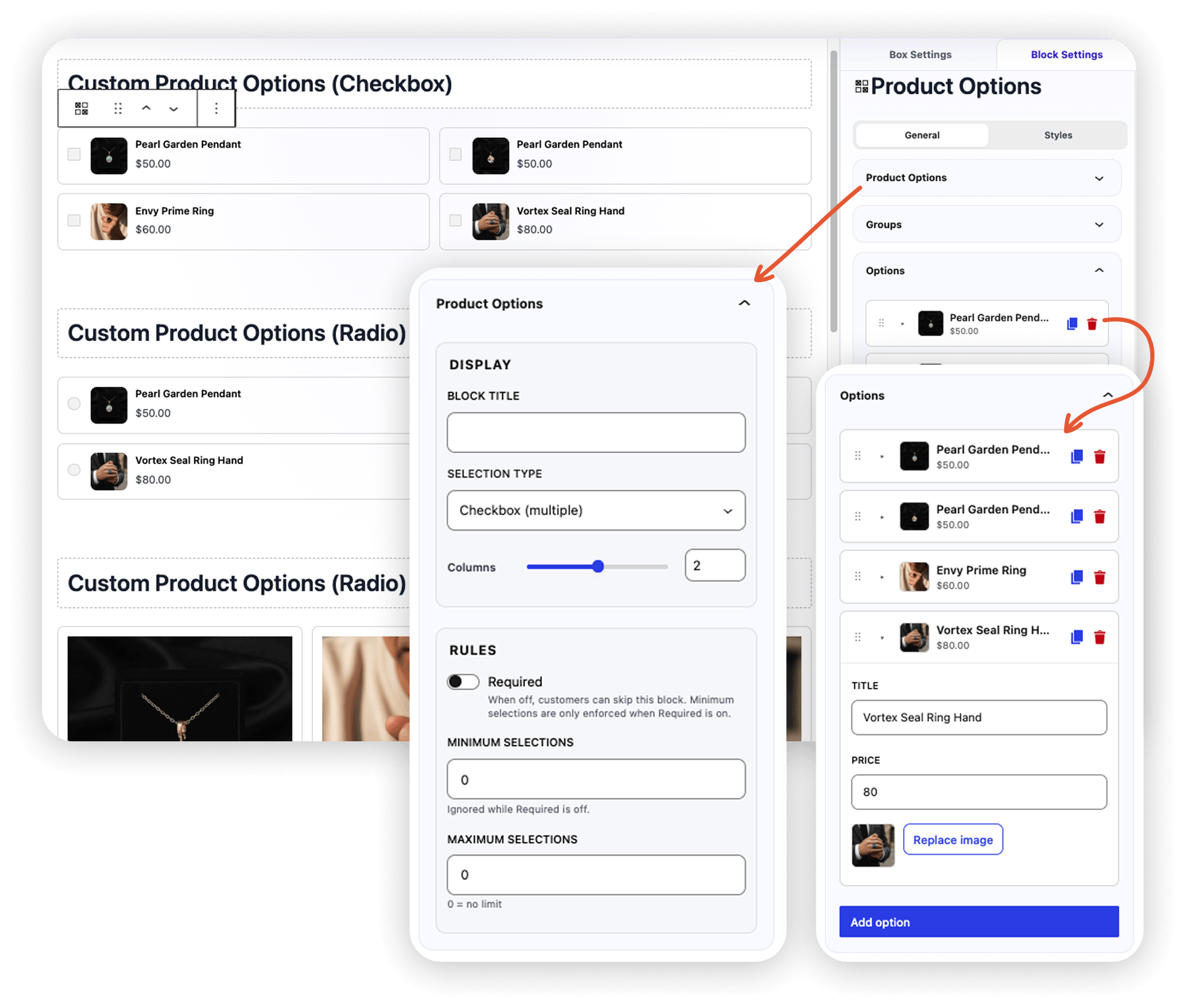
Custom Product Options
Offer wrapping, upgrades, engraving fees, and extras as priced choices inside a step — without creating a separate WooCommerce product for every add-on. Lift AOV with finishing touches that feel native to the box.
- Checkbox, radio, or image-select layouts
- Title, price & image per option — no extra SKUs
- Optional groups, required rules & min/max selections
- Drag and drop to reorder, duplicate or delete options
- Carries through summary, cart, checkout & orders
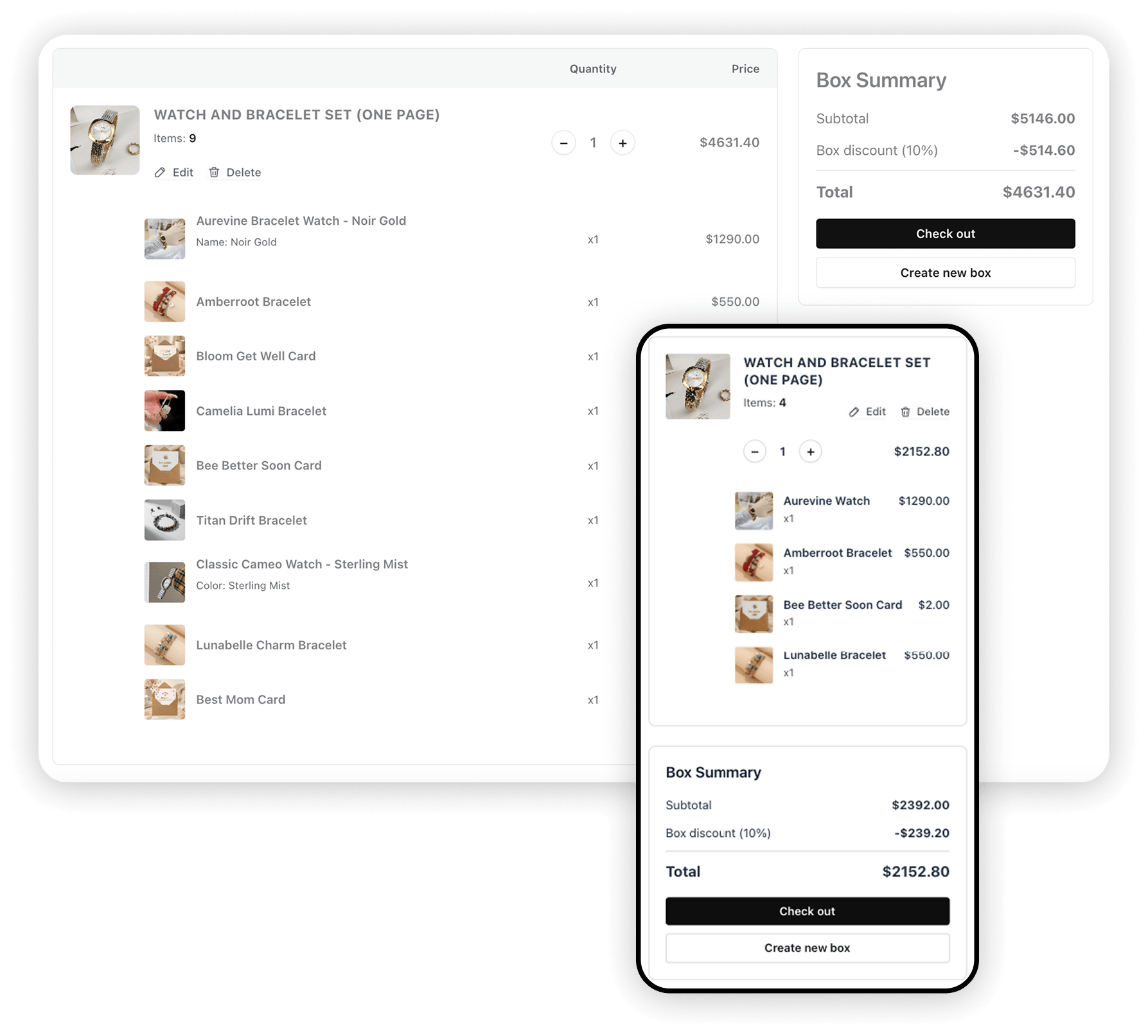
Final Review Before Checkout
A clean summary of every item, quantity, and total removes last-second doubt. Confident buyers finish — confused buyers abandon. This step closes the sale.
- Full box contents at a glance
- Easy edits before add to cart
- Native cart & checkout — classic and blocks
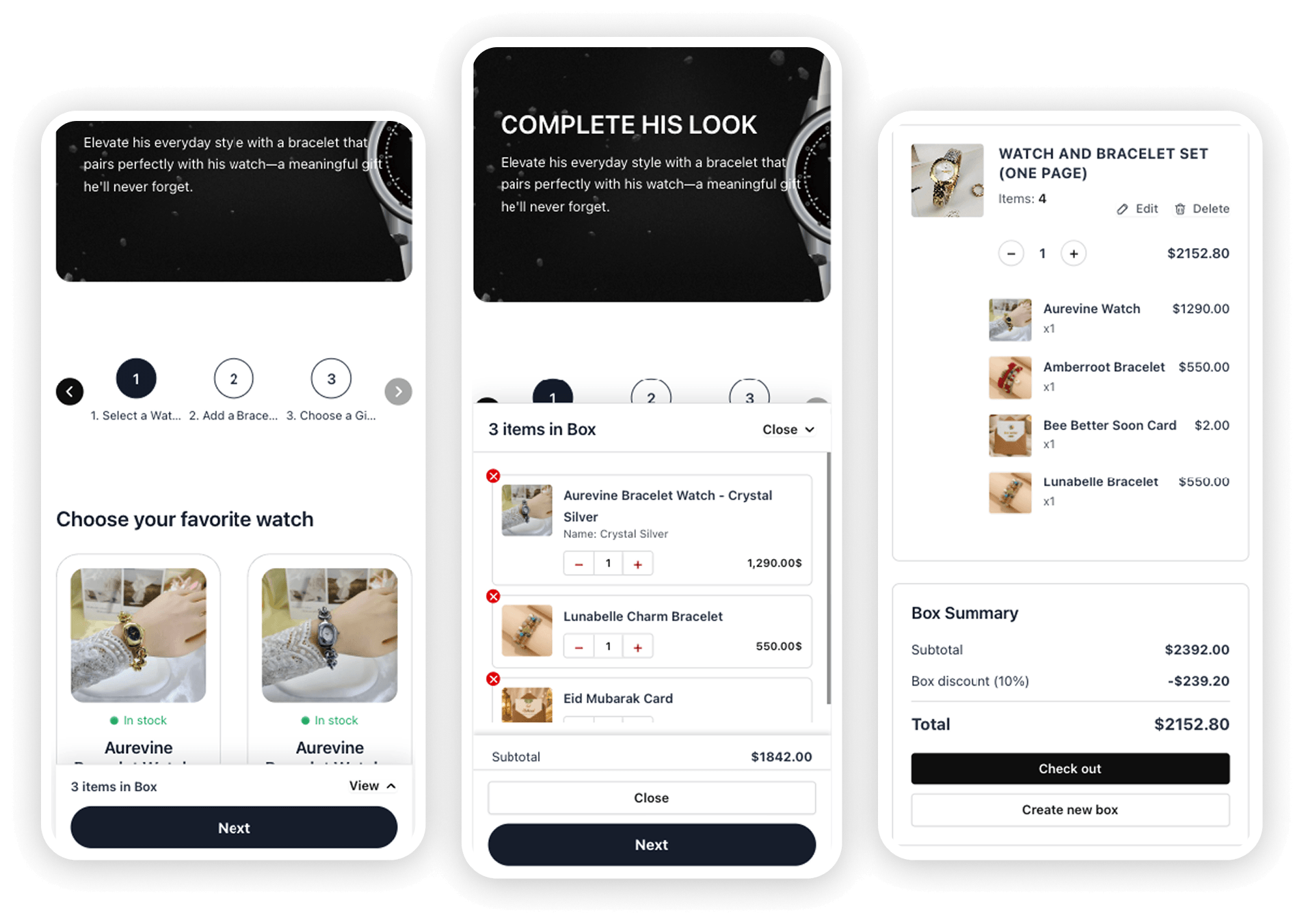
Mobile-First Shopping Experience
Most gift shopping happens on phones. Sticky summaries, touch-friendly slots, and clean steps mean mobile visitors complete boxes instead of bouncing.
- Responsive steps & product grids
- Summary on the right, left, or sticky bottom bar
- Mobile summary sheet for live totals
- Fast taps — less friction, more checkouts
- Looks premium on every device
More Features
More ways to grow AOV
Quick View, filters, steps, rules, and WooCommerce-ready tools — everything else shops need beyond the headline features.
01
Quick View for variable products
Variable products open a Quick View popup — shoppers pick size, color, or other attributes, then add the exact variation to the box.
02
Category filter + pagination
Let shoppers filter by category chips (All + each category), then browse large catalogs with Load more or numbered pages — not endless scrolling.
03
Grid, list, carousel & radio
Display products as a dense grid, detailed list, swipeable carousel, or radio list when shoppers must pick exactly one parent box or size.
04
Summary where you need it
Right sidebar, left sidebar, or sticky bottom bar on desktop — plus a mobile sheet so totals stay visible.
05
Stock status & low-stock cues
Show in stock, low stock, or out of stock on product cards. Set a low-stock threshold so scarcity nudges faster decisions.
06
Banner & featured image
Add a box-level banner with image and copy, plus a featured finished-box image that shows on review, cart, checkout, and emails.
01
Easy steps creation & manage
Add, rename, reorder, duplicate, or delete steps in seconds. Style step navigation, then switch between multi-page guided flow or one-page scroll.
02
Per-block quantity rules
Require exact picks per step — min, max, and required/optional — so “pick 1 card” and “up to 3 snacks” work without custom code.
03
Text & Labels
Customize every storefront string — including Retail total, Total Save, Fixed box price, and Quick View labels — without a developer.
04
Duplicate any box
Clone a finished box in one click from All Boxes — reuse seasonal layouts, swap products, and launch the next campaign faster.
05
Shortcode & display page
Place [pbb_box id="123"] anywhere, or assign a dedicated display page when you create the box — live in minutes.
06
Live preview before publish
Preview the storefront experience from the editor — check steps, Quick View, totals, and mobile layout before customers see it.
07
Copy & paste styles and blocks
Copy styles to reuse spacing, typography, and colors across blocks — or copy a full block and paste it into any step without rebuilding from scratch.
08
Tools: export, import & cache
Back up boxes as JSON, move builders between sites, clear cache, regenerate data, and check system status from one screen.
09
Blocks checkout & HPOS ready
Works with classic cart/checkout and Cart & Checkout blocks. Declares High-Performance Order Storage compatibility for modern Woo stores.
01
Fixed Box Price
Sell “any 5 for $60” style deals — shoppers fill required slots and pay one clear bundle price, no matter which products they pick.
02
Tiered Quantity Discount
Reward shoppers as they fill more slots — custom quantity thresholds with % off, live progress hints toward the next savings level.
03
Predefined Box Sizes
Offer fixed pack sizes (9 / 14 / 24 Pack, etc.). Shoppers pick a pack, then fill exactly that many slots at the pack price with optional pack discounts.
04
Gift Notes & Personalization
Birthday or holiday surprise — shoppers add a gift message in-flow, plus unlock free gift products with quantity or spend rules.
05
Gift rules that unlock freebies
Reward shoppers with free gift products when they hit quantity or spend targets — separate from gift messages.
06
Box discounts + progress hints
Set a minimum item count and offer % or fixed off. Show “Add 2 more for 10% off” so shoppers finish fuller boxes.
07
Order amount rules
Require a minimum (or maximum) box subtotal before checkout — keep every kit inside your margin band.
- Trusted WordPress experts
Built by the team at TrendyTheme
We’re the people behind premium WordPress themes and WooCommerce tools used by 20,000+ customers worldwide. Actively shipping products since 2015 — including modern AI-assisted workflows like the Product Box Builder AI Generator. You’re not buying a weekend side project: you get battle-tested code, documentation, and support from a team that still answers tickets.
2015
In business
20k+
Customers
WP + WC
Daily focus
Trusted
Why store owners trust us
-
01
Long-term craft Hand-crafted products with long-term updates
-
02
Human support Real human support — not ticket black holes
-
03
Woo-ready WooCommerce best practices & HPOS-ready mindset
-
04
See the work Visit trendytheme.net to see our work
Reviews
Store owners who grew with custom boxes
Real results from gift, food, and lifestyle WooCommerce stores
5.0
Average rating
3×
Faster launches
↑ AOV
Reported by sellers
AI drafts the structure; we tweak products and publish. Corporate clients love building their own snack boxes. Fixed pricing + gift notes cut our email back-and-forth in half, and AOV is clearly up.
RK
Rafi Khan
Ops Lead, DeskBite Snacks
We used the Makeup Kit AI template for our holiday campaign, edited a few steps, and sold out two restocks. The multi-step builder feels premium on mobile — AI just got us there faster.
MS
Maya Santos
E‑com Manager, Glow Ritual Co.
Pricing
Simple plans — AI included
Every plan includes the AI Box Generator. Pick yearly for flexibility or lifetime for a one-time investment.
Starter
1 website license
44% OFF
$49
$89
/year
You Save $40
- 1 WooCommerce site
- AI Box Generator — Groq, OpenAI, OpenRouter & more
- 13 Starter Builders — duplicate, export & import
- Visual drag-and-drop editor with brand color schemes
- Unlimited box builders — multi-step & one-page layouts
- Fixed price, tiered, predefined packs & box discounts
- Gift notes, gift rules & custom product options
- Summary sidebar, sticky bar & adjustable width
- Quick View, category filters & mobile-first layouts
- Review step, banner images & stock status cues
- WooCommerce Blocks checkout & HPOS ready
- 1 year updates & support
Most Popular
Professional
5 website licenses
50% OFF
$99
$199
/year
You Save $100
- Up to 5 WooCommerce sites
- AI Box Generator + prompt templates on every site
- Everything in 1 Site — all builder & offer features
- Copy/paste blocks, live preview & text labels
- Priority email support
- Agency-friendly licensing
- 1 year updates & support
Agency
1000 website licenses
20% OFF
$399
$499
/year
You Save $100
- 1000 WooCommerce sites
- Full AI Generator on every site
- Everything in 5 Site — 1k client projects
- Best for freelancers & agencies
- VIP support queue
- 1 year updates & support
Starter Lifetime
1 website license
25% OFF
$149
$199
/lifetime
You Save $50
- 1 WooCommerce site
- AI Box Generator + prompt templates on every site
- Everything in Starter package — all builder & offer features
- Copy/paste blocks, live preview & text labels
- Priority email support
- Best for Personal Use
- Lifetime updates & support
Professional Lifetime
5 website licenses
28% OFF
$249
$349
/lifetime
You Save $100
- Up to 5 WooCommerce sites
- AI Box Generator + prompt templates on every site
- Everything in Starter package — all builder & offer features
- Copy/paste blocks, live preview & text labels
- Priority email support
- Agency-friendly licensing
- Lifetime updates & support
Most Popular
Agency Lifetime
1000 website licenses
16% OFF
$499
$599
/lifetime
You Save $100
- 1000 WooCommerce sites
- AI Box Generator + prompt templates on every site
- Everything in Starter package — all builder & offer features
- Copy/paste blocks, live preview & text labels
- Best for freelancers & agencies
- VIP support queue
- Lifetime updates & support
Your account will be created automatically. Please use a valid email address during checkout, you’ll receive the plugin download link and your account details via email.
14-Day Money-Back Guarantee
Try Product Box Builder risk-free. If it isn’t the right fit for your store within 14 days, contact us for a full refund — no awkward questions, no hard feelings.
FAQ
Frequently Asked Questions
Everything you need to know
What is the AI Box Generator?
Describe the box you want to sell (or pick a prompt template). AI builds a complete Product Box — steps, catalog-aware product suggestions, pricing style, and content — so you can edit and publish instead of configuring everything from scratch.Describe the box you want to sell (or pick a prompt template). AI builds a complete Product Box — steps, catalog-aware product suggestions, pricing style, and content — so you can edit and publish instead of configuring everything from scratch.
Which AI providers are supported?
Groq (great default), OpenAI, OpenRouter, Together, Ollama for local models, and a Custom endpoint. You bring your own API key in WooCommerce settings — no vendor lock-in.
What does Product Box Builder actually do?
It lets customers build custom gift boxes, bundles, or kits on your WooCommerce store — step by step — then add the complete box to cart. You control products, pricing rules, discounts, and layout. AI helps you create those builders faster.
How does this help me sell more?
AI gets campaigns live sooner (more selling days). Guided builders then encourage shoppers to fill multiple slots, unlock tiered discounts, and personalize gifts — typically raising average order value and conversion versus selling single products alone.
Does it work with my theme?
Yes. The builder uses shortcodes / display pages and follows WordPress & WooCommerce standards so it works with most modern themes. You can also style content with Gutenberg blocks.
Is it compatible with WooCommerce cart & checkout blocks?
Yes. Boxes are added through WooCommerce’s cart APIs. The plugin supports classic cart/checkout and Cart & Checkout blocks, and declares HPOS (High-Performance Order Storage) compatibility.
Can I create fixed-price gift boxes?
Yes. Choose the Fixed Box Price type, set how many products shoppers must pick, and set one bundle price — for example “any 5 for $60.” The summary shows empty slots to fill, then Retail total, Total Save, and Fixed box price once the box is complete. You can still stack an optional box discount on top.
How do tiered quantity discounts work?
With Tiered Quantity Discount, product prices add up normally and percentage off unlocks as shoppers add more items — for example 3 items = 10% off, 6 = 20%, 9 = 30%. The highest matching tier applies automatically, and live progress hints nudge shoppers toward the next savings level. Great for pick-and-mix, snacks, jewelry, and volume kits.
Can I offer multiple pack sizes (9 / 14 / 24 Pack)?
Yes. Choose Predefined Box Sizes, add packs with their own quantity, price, and optional discount %, then let shoppers pick a size and fill exactly that many slots. Show the pack picker in the summary or as the first step, with card or dropdown layouts and popular-choice badges.
What’s the difference between gift notes and gift rules?
Gift notes collect a personal message from the shopper. Gift rules unlock free gift products when quantity or spend targets are met — a powerful AOV lever on top of personalization.
Do I need to build every box from scratch?
No. Use the AI Box Generator for a custom structure from a prompt, or pick one of 13 Starter Builders (gift, pizza, jewelry, makeup, and more) and swap in your products. You can also Duplicate a finished box from All Boxes to clone it instantly. Inside the editor, Copy styles / Paste styles lets you reuse design across blocks, and Copy block / Paste block duplicates a full block into any step.
Can shoppers add product options?
Yes. Add Product Options blocks for wraps, upgrades, engraving fees, and extras — with checkbox, radio, or image-select layouts. Selected options add to the box total and carry through cart, checkout, and orders.
What is the refund policy?
We offer a 14-day money-back guarantee. If the plugin doesn’t meet your needs, reach out within 14 days of purchase for a full refund.
Who builds and supports this plugin?
Product Box Builder is developed by the team at TrendyTheme, actively building WordPress & WooCommerce products since 2015.